Bring Notes to Life with the Sticker Notes Typeface
If you have ever stared at a blank digital canvas or a stark white document, you know the paralysis that comes with needing to convey an idea that feels "finished" but approachable. We often spend hours looking for the right stock photo or icon set to break the monotony of standard text, but sometimes the solution lies in the typography itself. Enter Sticker Notes, a distinct dingbat font that functions less like a typeface and more like a complete illustration kit.
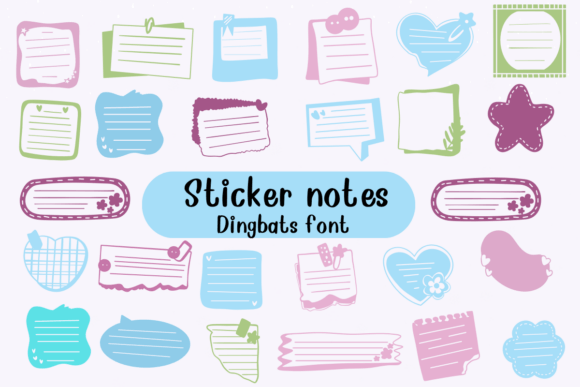
Unlike standard display fonts that focus on the shape of letters A through Z, Sticker Notes repurposes the character map to deliver visual assets. Each keystroke produces a unique, colorful representation of a sticky note. These aren't flat, static rectangles; they feature folded corners, curled edges, and varying textures that mimic real paper. For designers, this shifts the workflow. Instead of importing vectors or raster images, you can type out a series of shapes instantly. It allows for rapid prototyping and layout composition, giving you that tactile, "paper on a desk" aesthetic without the clutter of a physical scanner.
The Visual Personality of Sticker Notes
The charm of this typeface lies in its imperfection and vibrancy. In a world dominated by clean sans serif font families and minimalist web design, Sticker Notes brings a necessary dose of whimsy. The visual style is unapologetically playful, utilizing a wide spectrum of colors ranging from neon pinks to soft pastels. This variety makes it an incredibly versatile tool for adding accents to a project. Because the shapes are irregular, they possess an organic quality that rigid geometric icons lack. They feel handmade, which instantly warms up the tone of your communication.
However, this strong personality comes with a specific responsibility regarding brand identity. Sticker Notes is not a serif font meant for body text, nor is it a script font for elegant wedding invitations. It is a niche asset designed to inject energy. Its visual appeal is high-impact but low-volume; it works best when used as a garnish rather than the main course. If you are building a brand that relies on authority and stoicism, this might clash. But if your brand voice is friendly, educational, or youthful, the visual language of these sticky notes becomes a powerful tool for connection.
Strategic Applications: Where Sticker Notes Fits Best
Understanding where to deploy a creative font like this is half the battle. Its primary strength lies in grabbing attention without overwhelming the viewer. Here are several practical contexts where Sticker Notes excels:
- Social Media Graphics: On platforms like Instagram or Pinterest, where scroll-stopping power is currency, using a character from Sticker Notes as a background element or a "highlight" marker can make your text pop. It helps separate information visually, acting as a digital highlighter.
- Editorial and Packaging Design: In magazine layouts or on product packaging, these shapes work beautifully as call-out boxes. Instead of a standard text box, a typed sticky note character can frame a quote or a discount code, making the information feel urgent and casual.
- Presentation and Web Design: When designing slide decks or website hero sections, the font breaks up the monotony of corporate layouts. It signals to the viewer that the content is accessible and easy to digest.
- Invitations and Stationery: For personal projects, such as birthday invites or classroom materials, the font does the heavy lifting of decoration. It replaces the need for complex design assets, allowing even non-designers to create professional-looking printables.
Influence on Engagement and Readability
It is a common misconception that modern typography is solely about legibility. While legibility is paramount for body copy, display elements like Sticker Notes serve a different psychological function. They influence visual hierarchy and audience engagement through association. When a viewer sees a sticky note shape, they subconsciously associate it with a reminder, a task, or a friendly annotation. This primes them to pay attention to the content inside that shape.
However, you must manage readability carefully. Because Sticker Notes is a dingbat font, the characters are images, not letters. If you place text *over* these shapes, you risk the text disappearing into the colorful patterns. The best practice is to treat these shapes as containers. Use your standard premier font for the message, and use Sticker Notes to create the background shape or the accent decoration. This pairing ensures that your message remains crisp while benefiting from the playful aesthetic.
Practical Guidance for Implementation
If you are considering adding this to your toolkit, approach it as you would any other commercial font or premium font. Here is a checklist for evaluating the fit:
- Evaluate the Context: Does your project require a "human" touch? If you are writing a legal brief, skip it. If you are designing a flyer for a bake sale or a tech startup’s casual newsletter, it is a perfect match.
- Review the Character Map: Before purchasing or downloading, look at the full glyph set. Does the variety of shapes suit your needs? Some projects might need rounded corners, while others need torn paper edges. Ensure the font offers enough variety to avoid repetition in a large layout.
- Test Font Pairing: Sticker Notes pairs best with neutral, geometric typefaces. A clean sans serif font like Helvetica, Futura, or Roboto provides a modern counterpoint to the chaotic, organic nature of the sticky notes. Avoid pairing it with other handwritten fonts or complex display fonts, as this will create visual noise that confuses the eye.
- Check Licensing: If you are using this for logo design or merchandise, ensure your license allows for commercial use. Most design assets come with specific terms regarding embedding in digital products or printing on physical goods.
Ultimately, Sticker Notes is a utility disguised as a novelty. It solves the design problem of "how do I make this look fun and interactive?" By integrating these colorful shapes into your workflow, you move beyond static text and create experiences that feel more dynamic and engaging for your audience. It proves that sometimes, the best way to be taken seriously in business or design is to not take yourself too seriously at all.